
Introduction
Integrating a route optimization SDK in Java sits in the middle of the complexity spectrum. Unlike a simple utility library, it requires REST API familiarity, dependency management, and comfort with asynchronous Java patterns. That said, it's well within reach for any backend developer who regularly builds against external APIs. Most integration failures come down to the same handful of mistakes: incorrect coordinate formats, missing request fields, and poorly handled async responses.
This task belongs to Java developers who know their way around Maven or Gradle, HTTP client libraries, and JSON parsing. If REST clients and environment-specific configuration are familiar territory, you're ready. If not, pair with a backend engineer before diving in.
Careless integration creates expensive problems that are hard to trace:
- Malformed request bodies return silent errors that only surface when drivers reach wrong addresses
- Poor async handling blocks threads and degrades server throughput under load
- Misconfigured API keys expose credentials in logs and version control
- Dependency conflicts break production builds when library versions clash
This guide walks through the complete, correct process—from environment setup through validating your first real response. Each step is deliberate — skip one, and you're likely looking at a debugging session that costs far more time than setup ever would.
TLDR
- Successful Java route optimization integration depends on build tool setup, secure API key management, correct JSON construction, and async-aware response handling
- Choose a provider with clear REST documentation or a native Java library before writing a single line of code
- Test against a known two-stop route before deploying to production vehicles
- Most integration failures trace back to coordinate format errors, improper async patterns, or missing mandatory request fields
- NextBillion.ai's per-vehicle pricing prevents the unpredictable billing spikes that hit high-volume logistics teams using per-call models
Prerequisites and Environment Setup
Before writing code, verify these foundational requirements are in place. Gaps here tend to surface as cryptic errors late in integration.
Required Platform Components:
- JDK 11 or higher (JDK 17 or 21 recommended for LTS support through 2029-2031)
- Maven 3.9+ or Gradle 9.4+ configured in your project
- Active API key from your chosen route optimization provider
- Outbound HTTPS access from deployment environment
Compatibility Verification:Check that your HTTP client choice aligns with your Java version. The built-in java.net.http.HttpClient requires JDK 11 minimum but offers clean async support via CompletableFuture. If you're using OkHttp or Apache HttpClient, verify version compatibility with your JDK and confirm the SDK doesn't impose conflicting requirements.
Determine whether your provider offers a native Java library or requires direct REST API wrapping. Native libraries handle serialization and authentication setup, while REST wrappers give you full control but require more boilerplate.
Security and Quota Checks:With your library choice settled, two checks remain before writing any code. First, never embed API keys directly in source code. GitGuardian detected 28 million hardcoded secrets in public GitHub commits in 2025, and private repositories are six times more likely to contain exposed credentials. Store keys as environment variables or in a secrets manager.
Second, confirm your API account has sufficient quota for expected call volume. Per-vehicle or per-order pricing models — like NextBillion.ai's — keep costs predictable at scale, unlike per-call pricing that grows linearly with every request.
How to Integrate a Route Optimization SDK in Java (Step-by-Step)
Java SDK integration follows a clear sequence: dependency declaration, authentication setup, request construction, API call, and response parsing. Skipping or rushing any step is a common source of hard-to-diagnose failures. Each phase builds on the previous one, so verify each works before moving forward.
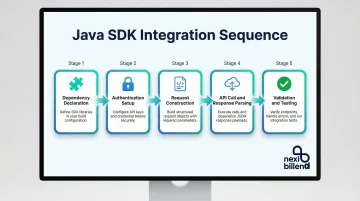
Add the Dependency to Your Build File
Add the SDK as a Maven or Gradle dependency using the provider's published artifact coordinates. Pin to a specific version rather than using dynamic version ranges—this prevents unexpected breaking changes during builds.
Maven example:
<dependency> <groupId>com.example.routing</groupId> <artifactId>route-optimization-client</artifactId> <version>2.4.1</version></dependency>Gradle example:
implementation 'com.example.routing:route-optimization-client:2.4.1'Gradle documentation explicitly warns that dynamic versions (e.g., 1.+) lead to unreproducible builds. Lock to specific versions and update when you're ready to test compatibility.
Configure Authentication
Load the API key from an environment variable and pass it to the SDK client constructor or HTTP header. Hard-coded keys in source files are flagged as security violations in most CI/CD pipelines.
String apiKey = System.getenv("ROUTE_OPT_API_KEY");if (apiKey == null || apiKey.isEmpty()) { throw new IllegalStateException( "ROUTE_OPT_API_KEY environment variable is not set" );}// SDK constructor patternRouteOptimizationClient client = new RouteOptimizationClient(apiKey);// Or HTTP header patternHttpClient httpClient = HttpClient.newHttpClient();HttpRequest request = HttpRequest.newBuilder() .uri(URI.create("https://api.provider.com/optimize")) .header("Authorization", "Bearer " + apiKey) .POST(bodyPublisher) .build();The startup assertion prevents null keys from propagating silently to API calls, where they return cryptic 401 errors in production.
Build the Optimization Request Object
Construct the request by defining depot/start location, adding stops as coordinate pairs, and setting constraint parameters. RFC 7946 mandates that coordinates use WGS 84 datum in decimal degrees, with longitude first, then latitude.
OptimizationRequest request = new OptimizationRequest() .setDepot(new Location(-80.8431, 35.2271)) // Charlotte, NC .addStop(new Location(-80.8200, 35.2100)) .addStop(new Location(-80.7900, 35.1950)) .setVehicleCount(1) .setVehicleCapacity(100) .addTimeWindow( new TimeWindow() .setStart("09:00") .setEnd("17:00") );Missing required fields typically return a 400 error with generic messages. Pre-validate that:
- All coordinates are in decimal degrees (not degrees/minutes/seconds)
- Latitude ranges from -90 to 90
- Longitude ranges from -180 to 180
- Required constraint fields are populated (check provider documentation)
Execute the API Call and Handle the Response
Java 11's HttpClient supports both synchronous and asynchronous execution—choose based on whether your application can afford to block the calling thread. The sendAsync method returns a CompletableFuture for non-blocking operation.
Synchronous (blocks calling thread):
OptimizationResponse response = client.optimize(request);List<Route> routes = response.getRoutes();Asynchronous (recommended for server applications):
CompletableFuture<OptimizationResponse> futureResponse = client.optimizeAsync(request);futureResponse.thenAccept(response -> { List<Route> routes = response.getRoutes(); // Process routes without blocking}).exceptionally(ex -> { logger.error("Optimization failed", ex); return null;});Always check for error fields before processing route data:
if (response.hasErrors()) { logger.warn("Optimization returned errors: {}", response.getErrorMessage()); // Handle unassigned stops if present List<Stop> unassigned = response.getUnassignedStops();}Handle Errors and Retries Correctly
Once you're checking for errors in the response, the next layer of resilience is handling failures at the HTTP level. Not all errors are worth retrying—treat them differently based on status code:
- 4xx errors: Fix the request; retrying won't help
- 5xx errors: Retry with exponential backoff—these are transient server-side failures
- 429 Too Many Requests: Respect the
Retry-Afterheader before retrying
AWS, Google Cloud, and Azure all recommend adding jitter (randomness) to exponential backoff to prevent thundering herd problems when multiple clients retry simultaneously.
int maxRetries = 3;int attempt = 0;long baseDelayMs = 1000;while (attempt < maxRetries) { try { OptimizationResponse response = client.optimize(request); return response; } catch (ApiException ex) { int statusCode = ex.getStatusCode(); // 4xx errors: fix the request if (statusCode >= 400 && statusCode < 500) { logger.error("Client error ({}): {}", statusCode, ex.getMessage()); throw ex; // Don't retry } // 5xx errors: retry with backoff if (statusCode >= 500 && attempt < maxRetries - 1) { long delay = baseDelayMs * (1L << attempt); long jitter = (long) (Math.random() * delay * 0.1); Thread.sleep(delay + jitter); attempt++; } else { throw ex; } }}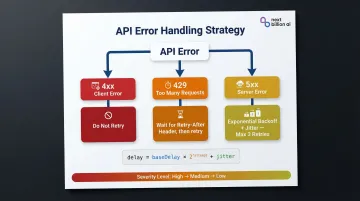
RFC 6585 defines 429 Too Many Requests and specifies that responses may include a Retry-After header indicating how long to wait before retrying.
Validating Your Integration
Construct a test request with two known addresses—a fixed start point and a single stop. Send it and verify the returned route contains exactly one visit in the correct order. If the result is empty or malformed, you have a configuration problem, not a logic problem.
@Testpublic void testBasicRouteOptimization() { OptimizationRequest testRequest = new OptimizationRequest() .setDepot(new Location(-80.8431, 35.2271)) // Known location .addStop(new Location(-80.8200, 35.2100)); // Known destination OptimizationResponse response = client.optimize(testRequest); assertNotNull(response); assertEquals(1, response.getRoutes().size()); assertEquals(1, response.getRoutes().get(0).getStops().size()); assertTrue(response.getEstimatedDistance() > 0); assertTrue(response.getEstimatedDuration() > 0);}Functional Checks After Successful Test Call:
- Response time is under one second for routes with ≤10 stops — sub-second latency is expected for a correctly configured integration
- Response includes estimated travel time and distance, not just stop order
- Coordinates in response match expected precision
Build a simple smoke test into your CI pipeline that fires a known request and asserts a non-empty response. A broken optimization call is far cheaper to catch in CI than in production.
Common Implementation Problems and How to Fix Them
Dependency Conflict with Existing JSON Libraries
Problem: The route optimization SDK pulls in a version of Gson or Jackson that conflicts with your project's version, causing NoSuchMethodError or ClassCastException at runtime.
Likely Cause: Maven uses nearest-wins resolution for dependency conflicts, which can quietly pick the wrong version. The Java Language Specification notes that deleting or changing methods breaks binary compatibility.
Fix: Explicitly declare the required JSON library version in your pom.xml or build.gradle to override transitive resolution:
<dependency> <groupId>com.fasterxml.jackson.core</groupId> <artifactId>jackson-databind</artifactId> <version>2.21.2</version></dependency>Run mvn dependency:tree -Dverbose to audit conflicts before they reach runtime.
API Returns Empty Routes Despite Valid Input
Problem: Optimization call succeeds with 200 status, but the returned routes array is empty or contains no visits.
Likely Cause: A required constraint field—vehicle capacity, time window format, or shipment demand—is missing or set to zero, causing the optimizer to determine no feasible solution exists without surfacing an explicit error.
Fix: Work through these steps to isolate the root cause:
- Run the same payload directly via cURL or Postman to determine whether the issue is in the SDK wrapper or the request data itself
- Cross-reference every field against the API's parameter documentation, paying close attention to capacity units and time window formats
- Check the response for an
unassignedorskippedShipmentsfield—stops listed there signal that the optimizer found no feasible assignment, not that the request failed
Authentication Failures in CI/CD Environments
Problem: SDK works locally but returns 401 Unauthorized in CI pipelines or containerized deployments.
Likely Cause: The environment variable holding the API key is not injected into the container or pipeline job, so System.getenv() returns null and the SDK sends a request with no credentials.
Fix: Verify the environment variable is declared in your CI configuration file. GitHub Actions uses the secrets context, GitLab CI makes variables available as environment variables, and Jenkins uses the Credentials Binding plugin. Add a startup assertion that throws a clear exception if the key is null instead of letting a null key reach the API call.
Pro Tips for a Smoother Java Route Optimization SDK Integration
Four practices consistently separate smooth integrations from painful ones:
Cache the client as a singleton. Java's HttpClient docs note it's immutable and built to send multiple requests. OkHttp makes the same point: create one instance, use it everywhere. A new client per request burns connection pool resources and adds measurable latency.
Test with realistic stop counts from the start. A 3-stop request and a 30-stop request behave very differently — in response time, solver behavior, and constraint handling. Don't validate your integration against toy examples. Use data that reflects your actual workload.
Log every API call in structured format. Log4j2's JsonTemplateLayout is a solid starting point. Capture the request payload, HTTP status, response time, and a truncated response body. When a driver reports a wrong sequence, reconstructing what was actually sent is nearly impossible without these logs.
Reach out to support before burning days on a config issue. Problems that take days to trace internally often resolve in minutes with someone who knows common integration pitfalls. NextBillion.ai's solution engineers can review request payloads directly and pinpoint configuration problems fast.

Conclusion
The quality of your Java route optimization SDK integration directly determines operational reliability. A correct integration reduces misrouted vehicles and failed deliveries; a careless one creates production incidents that are expensive to debug and disruptive to operations.
Follow the setup sequence precisely:
- Verify prerequisites and environment compatibility
- Configure authentication securely before any API calls
- Construct requests with correct coordinate formats
- Implement async patterns to avoid blocking threads
- Build error handling from the start, not as an afterthought
Test against known data before production deployment, and instrument your integration with structured logging that captures request/response details.
Route optimization is critical infrastructure for logistics operations. Treat the integration with the same rigor you apply to database connections and payment processing. Skipping that discipline doesn't show up in development — it shows up as a driver stranded with an invalid route at 6 AM.
Frequently Asked Questions
What Java version is required to use a route optimization SDK?
Most modern route optimization SDKs require JDK 11 or higher, as they rely on the built-in Java HttpClient introduced in Java 11. Oracle's LTS roadmap covers JDK 11, 17, and 21 through 2029–2032. Developers on older JVMs should upgrade or use a library like OkHttp to wrap REST calls directly.
How do I handle API rate limits when making route optimization requests from Java?
Rate limit errors typically return a 429 status code. RFC 6585 defines this status and notes responses may include a Retry-After header. Implement exponential backoff with jitter before retrying—never hammer the API in a tight loop. Use a scheduled thread pool or reactive library to space retries appropriately.
Can I integrate a route optimization SDK with Spring Boot?
Yes, integration works well with Spring Boot. Declare the API client as a @Bean in a configuration class, inject the API key via @Value from application properties, and use @Async on service methods for non-blocking calls. Add @EnableAsync to your configuration class to activate it.
What is the difference between synchronous and asynchronous route optimization requests in Java?
Synchronous calls block the calling thread until the response arrives—fine for small background jobs, but it degrades throughput in web request handlers. CompletableFuture-based async calls let the thread continue while optimization runs, which is the preferred pattern for server-side applications.
How do I test route optimization API calls without incurring charges?
Many route optimization providers offer a sandbox environment or free tier with limited monthly calls for development. Check your provider's documentation for a test API key or mock endpoint. Use WireMock to stub API responses for unit tests that should not make real network calls—configure stubs using stubFor(get(urlEqualTo("/optimize")).willReturn(aResponse().withStatus(200))).
What should I do if the route optimization SDK returns a solution that ignores some of my stops?
Unserved stops typically appear in a separate skippedShipments or unassigned field in the response when constraints cannot be satisfied. Review whether the stops have conflicting time windows, exceed vehicle capacity, or fall outside the permitted service area. Adjust constraints or vehicle definitions, or contact your provider's support team to diagnose feasibility issues.