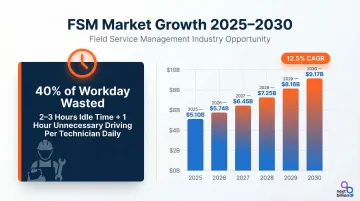
Scheduling and routing software directly impacts contractor profitability. The problem is real and costly: field technicians waste up to 40% of their workday on non-value-adding activities, including 2 to 3 hours of idle time and an additional hour spent on unnecessary driving, according to McKinsey research. The Field Service Management (FSM) market is responding to this pain point, projected to grow from $5.10 billion in 2025 to $9.17 billion by 2030 at a 12.5% CAGR, driven by contractors seeking measurable efficiency gains.
The right software reduces fuel waste, cuts idle time, improves on-time arrival rates, and enables more jobs per day—directly translating operational efficiency into revenue.
TL;DR
- Scheduling and routing software automates job assignment, optimizes travel routes, and enables real-time crew management
- The strongest platforms pair AI-powered dispatching and multi-stop route optimization with mobile field access and direct integrations
- Evaluate based on constraint-handling flexibility, ease of use, pricing transparency, integration capabilities, and scalability
- This article reviews NextBillion.ai, ServiceTitan, Jobber, Housecall Pro, and Workyard
- Smaller contractors typically benefit from Jobber or Housecall Pro; larger operations needing deep route optimization should look closely at NextBillion.ai
What is Scheduling & Routing Software for Contractors?
Scheduling and routing software for contractors combines job dispatching, technician/crew assignment, and optimized multi-stop route planning into a single workflow. Unlike generic calendar apps or basic GPS tools, these platforms handle the complexity of matching the right technician to the right job based on skills, availability, and location—while calculating the most efficient travel sequence between stops.
That's where generic tools fall short. Contractors face operational constraints that off-the-shelf apps simply weren't built for:
- Skill-based job matching — assigning an HVAC job to a certified technician, not just anyone available
- Time-window constraints — arriving within the customer's scheduled availability
- Real-time traffic adaptation — rerouting around delays as they happen
- Equipment and territory routing — ensuring the right truck with the right parts covers the right zone
Who Uses This Software?
These platforms serve mobile workforces across trades:
- HVAC, plumbing, and electrical contractors managing service calls
- Pest control companies running recurring routes
- Construction crews moving between job sites
- Landscaping and cleaning services scheduling daily stops
- Any trade contractor operating across service zones with multiple technicians or crews
Nearly 35% of buyers still rely on manual methods like spreadsheets, which lead to delays and errors as operations scale. Dedicated FSM systems centralize scheduling, dispatching, inventory tracking, and mobile work order management. The result: fewer manual errors, faster response times, and dispatchers who always know where their crews stand.
Best Scheduling & Routing Software for Contractors
We evaluated these platforms based on route optimization depth, scheduling flexibility, mobile usability, integration options, and value for contractor-specific workflows. Each solution addresses different operational priorities, from AI-powered routing at enterprise scale to streamlined mobile-first tools for small teams.
NextBillion.ai
NextBillion.ai is an AI-powered route optimization and mapping API platform built for enterprises and field service businesses managing complex, high-volume contractor dispatch operations. The platform powers routing for field service customers including Hawx Pest Control and Service Autopilot (Xplor), delivering sophisticated optimization capabilities that traditional FSM tools often lack.
Key Differentiators:
- 50+ hard and soft routing constraints including time windows, technician skills, vehicle capacity, maximum waiting times, and shift timings
- Sub-second route recalculation enabling real-time dynamic dispatch adjustments as job conditions change
- Truck-compliant routing accounting for vehicle-specific restrictions like weight limits and dimensional constraints
- Large-scale distance matrix computation supporting up to 5000×5000 elements, far exceeding the 25×25 limitations of many providers
- Predictable per-vehicle or per-order pricing (not per-API-call) that keeps costs scalable and transparent as operations grow
| Key Features | AI route optimization with 50+ constraints, multi-stop sequencing, real-time traffic handling, distance matrix API, custom map editing, truck-compliant routing |
|---|---|
| Pricing Model | Per-vehicle or per-order fixed pricing; no per-API-call billing; predictable monthly costs; custom pricing based on operational scale |
| Best For | Contractors and field service platforms needing deep route optimization, API-first integration, or custom routing logic at enterprise scale |
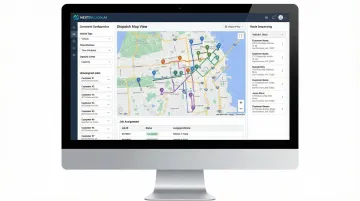
NextBillion.ai integrates natively with telematics platforms including Samsara, Geotab, Motive, and Netradyne, enabling contractors to dispatch optimized routes directly to driver applications without manual re-entry. The platform typically integrates within one week and offers dedicated support from solution engineers throughout implementation.
ServiceTitan
ServiceTitan is an enterprise-grade field service management platform widely adopted by mid-to-large HVAC, plumbing, and electrical contractors. It covers the full job lifecycle—customer call booking, dispatching, job completion, invoicing, and payment processing—in a single system built for trade contractors.
Key Differentiators:
- AI-assisted dispatching (Dispatch Pro) runs thousands of scenarios to match the best technician to every job based on location, skills, and availability
- Real-time technician GPS tracking with property data display on the dispatch board
- Integrated CRM and invoicing enabling seamless customer communication, mobile estimates, and paperless invoicing
- Comprehensive reporting dashboards providing visibility into job profitability, technician performance, and operational KPIs
| Key Features | Intelligent dispatch board, technician GPS tracking, job scheduling automation, customer notification tools, reporting dashboards, CRM integration, mobile invoicing |
|---|---|
| Pricing Model | Custom enterprise pricing; quote-only model with tiers (Starter, Essentials, The Works) based on per-technician pricing; specific dollar amounts not publicly listed |
| Best For | Mid-to-large trade contractors (HVAC, plumbing, electrical) seeking an all-in-one field service management system with deep CRM and business management tools |
ServiceTitan serves approximately 10,800 active customers with a gross dollar retention rate above 95%. On G2, it holds a 4.5/5 rating based on 353 reviews—reviewers praise the feature depth, though the initial setup and learning curve are consistently noted as time investments.
Jobber
Jobber is a scheduling and business management platform built for small-to-mid-size home service and trade contractors. It covers quoting, scheduling, routing, invoicing, and client management in one interface—straightforward enough that most teams are up and running within a day.
Key Differentiators:
- Drag-and-drop scheduling with color-coded calendar views (day, week, or month) for easy visual planning
- Built-in route optimization automatically generating the fastest, most fuel-efficient daily job sequences
- Client Hub offering a self-serve online portal where clients can approve quotes and pay invoices
- Straightforward pricing tiers with published monthly rates, making budgeting predictable for growing contractors
| Key Features | Drag-and-drop scheduling, route optimization for daily stops, GPS tracking (via fleet partner integrations), automated client reminders, mobile app (iOS/Android), QuickBooks Online sync |
|---|---|
| Pricing Model | Tiered subscription plans (billed annually): Core ($29/mo, 1 user), Connect ($119/mo, up to 5 users), Grow ($199/mo, up to 10 users), Plus ($529/mo, up to 15 users) |
| Best For | Small-to-mid-size contractors in home services (landscaping, cleaning, pest control, HVAC) needing scheduling + CRM in one easy-to-use tool |
Trusted by over 350,000 home service pros across 50+ industries, Jobber holds a 4.6/5 rating on G2 based on 480 reviews. It's consistently rated highly for ease of use, though contractors who need detailed job costing or expense tracking may hit its limits.
Housecall Pro
Housecall Pro is a cloud-based platform for residential home service contractors, covering scheduling, dispatching, real-time technician tracking, and customer communication. Its mobile app is central to the experience—technicians can manage their full workday from their phones without touching a desktop.
Key Differentiators:
- Mobile-first design with instant job notifications for technicians via the mobile app
- In-app estimates and invoicing allowing technicians to create invoices and accept payments in the field
- Customer booking portal enabling online booking directly from Google or a business website, reducing admin overhead
- Automated appointment reminders and "On my way" texts improving customer communication and reducing no-shows
| Key Features | Drag-and-drop dispatch board, real-time GPS tracking (no hardware required), automated appointment reminders, mobile invoicing, customer booking portal, QuickBooks integration (Online and Desktop) |
|---|---|
| Pricing Model | Subscription-based (billed annually): Basic ($59/mo, 1 user), Essentials ($149/mo, up to 5 users), MAX (Custom pricing, up to 8 users with advanced reporting) |
| Best For | Residential contractors (HVAC, plumbing, cleaning) who prioritize mobile-first workflows and customer-facing booking features |
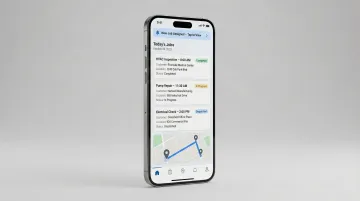
Housecall Pro serves over 45,000 businesses and 180,000+ pros. On G2, it holds a 4.3/5 rating based on 201 reviews—users rate the interface and customer communication tools highly, with occasional mobile app stability issues noted across reviews.
Workyard
Workyard is a GPS-first workforce management platform for construction and trade contractors managing hourly crews across multiple job sites. Unlike dispatch-focused tools, it centers on crew management—labor visibility, time tracking, and compliance—making it a strong fit for contractors who bill by the hour and need accurate job costing.
Key Differentiators:
- Precise GPS clock-in/clock-out with geofencing, automatically clocking employees in when they arrive at a job site
- Supervisor-led time tracking allowing foremen to clock in an entire crew with a single button push
- Mileage tracking automatically detecting driving and mapping detailed routes, including mileage and travel time
- Labor cost reporting by job site, auto-calculating costs on every clock-out and updating project and cost code reports in real time
| Key Features | GPS time tracking, geofence-based clock-in, crew scheduling, job site labor cost reports, mileage tracking, QuickBooks integration (Online and Desktop), auto-calculated labor costs |
|---|---|
| Pricing Model | Per-user monthly pricing: Starter ($6/mo per user + $50/mo base fee), Pro ($13/mo per user + $50/mo base fee), Enterprise (Custom pricing with automated project tracking and ERP integrations) |
| Best For | Construction and trade contractors managing hourly crews across job sites who need labor visibility, compliance tools, and precise time tracking |
Workyard is trusted by over 10,000 contractors, holding a 4.7/5 on Capterra and 4.8/5 on G2. GPS accuracy and payroll simplification are the most cited strengths, with some users flagging reliability gaps in low-signal areas.
How We Chose the Best Scheduling & Routing Software for Contractors
We evaluated these platforms on four critical dimensions: routing optimization depth (how many real-world constraints they handle), scheduling flexibility (skill-based matching, time windows, recurring jobs), mobile accessibility for field crews, and integration capability with payroll, CRM, or ERP systems.
Gartner identifies mandatory FSM features including analytics, integration with systems of record (CRM, ERP), field work planning (skills-based balancing, schedule optimization, routing), and mobile technician enablement. The platforms we selected meet these baseline requirements while offering distinct strengths for different contractor profiles.
The Most Common Mistake Contractors Make
Prioritizing price or feature count over operational fit is the fastest path to software failure.
Choosing a generic workforce tool that lacks route optimization forces dispatchers into workarounds: manually building routes in a separate app and then transferring them into the scheduling system. A powerful routing engine with no scheduling interface creates the opposite problem — technicians still don't know what jobs they're assigned to or when.
According to Capterra's 2024 Tech Trends Survey, 58% of U.S. buyers regret a recent software purchase, with top reasons including problematic handoff between sales and implementation teams (48%), poorly managed expectations (39%), unexpected costs (35%), and difficulty onboarding new users (34%).
Match the Tool to Your Primary Pain Point
The right platform depends on contractor type and scale:
- Trade contractors with repeat service routes (HVAC, plumbing, pest control) need different tools than construction crews managing jobsite labor
- High-volume dispatchers managing 50+ daily jobs need AI-powered constraint handling and real-time recalculation
- Small teams (under 10 people) benefit most from straightforward interfaces and affordable tiers
- Contractors with complex routing needs (truck restrictions, multi-day planning, territory-based assignments) should prioritize routing depth over all-in-one features
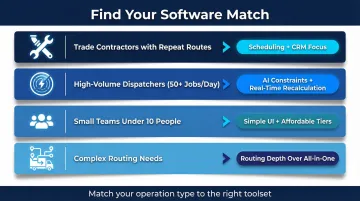
Start your evaluation with your primary operational pain point: routing complexity, workforce visibility, customer communication, or integration with existing tools. That answer narrows the field faster than any feature checklist.
Conclusion
The best scheduling and routing software for contractors eliminates the gap between where your crews are and where they need to be—balancing job complexity, route efficiency, and field communication in a single system. The right platform reduces wasted drive time, prevents missed appointments, and enables more jobs per day without adding headcount.
Before committing to a platform, run it against three practical criteria:
- Scalability: What works for 10 technicians may buckle at 100. Confirm the platform is tested at your target fleet size.
- Pricing model fit: Per-API-call billing becomes unpredictably expensive as job volume grows. Per-vehicle or per-order pricing is easier to budget.
- Integration compatibility: Verify native connections with your accounting, CRM, or payroll tools—most leading platforms offer direct integrations with QuickBooks and Salesforce.
If route optimization is a core requirement—not just a feature checkbox—NextBillion.ai is worth a close look. The API-first platform offers 50+ routing constraints, fixed monthly pricing instead of per-API-call billing, and direct integrations with Samsara, Geotab, Motive, and Netradyne. Across 150+ businesses served, it has delivered over $11 million in documented cost savings. Request a demo to see how it fits your field operations.
Frequently Asked Questions
What is the difference between scheduling software and routing software for contractors?
Scheduling software assigns jobs to technicians based on availability, skills, and time windows, while routing software determines the most efficient travel sequence between stops. The best contractor tools combine both—automatically scheduling jobs and then optimizing the order technicians visit them to minimize drive time.
Can small contractors benefit from scheduling and routing software?
Yes. Even solo or small teams benefit from optimized routing and automated scheduling—it reduces wasted drive time, prevents missed appointments, and frees up admin hours. Many platforms offer affordable tiers for smaller operations; Jobber's Core plan starts at $29/month, for example.
How does route optimization reduce costs for contractors?
Route optimization reduces fuel consumption, shortens drive time between jobs, and enables more service calls per day—resulting in lower vehicle operating costs and higher revenue per technician. A Forrester study found that optimizing routes slashed driving time to work sites by 50%.
What features should contractors prioritize when choosing scheduling software?
Prioritize multi-stop route optimization, real-time GPS tracking, mobile access for field crews, and integration with CRM or payroll tools. Also confirm the platform handles job constraints like time windows, skills, and territories—HVAC contractors need different capabilities than construction crews.
Does scheduling and routing software integrate with tools like QuickBooks or Salesforce?
Most leading platforms offer native integrations or API connections with accounting, CRM, and ERP tools. ServiceTitan, Jobber, Housecall Pro, and Workyard all connect with QuickBooks—though it's worth confirming whether your version (Online or Desktop) is supported. Salesforce integrations are commonly available via Zapier connectors.
Is AI-based scheduling worth it for contractors?
AI-driven scheduling improves job assignment accuracy by factoring in technician location, skills, and real-time conditions simultaneously. The result is fewer scheduling conflicts, higher first-time fix rates, and more jobs completed per technician per day. According to the 2023 WBR Insights AI in Field Service Report, 74% of organizations reported increased first-time fix rates after implementing AI-based dispatching.