Introduction
Polygon geofencing breaks in ways circular geofences don't. Unlike circular geofences that need only a center point and radius, polygon geofencing demands a precise sequence: authentication, coordinate definition, geofence registration, and event handling. Precision matters here—incorrect coordinate ordering, unclosed polygons, or misconfigured transition events cause silent failures that surface only in production.
This guide is for developers and technical teams building location-aware applications in logistics, fleet operations, last-mile delivery, and field services: any domain requiring custom geographic boundaries that follow real-world shapes like warehouse perimeters, delivery territories, or service zones.
What breaks when polygon geofencing goes wrong:
- Unclosed polygons fail validation with vague 400 errors
- Wrong coordinate ordering inverts zone logic, triggering events outside the boundary
- Unhandled transition events cause missed entry/exit alerts
- Silent API failures from missing authentication headers
According to industry research, the global geofencing market reached $1.95 billion in 2022 and is projected to grow to $9.36 billion by 2030, with transportation and logistics dominating adoption. Most failures trace back to the same preventable configuration mistakes.
This guide covers the full implementation: prerequisites, step-by-step integration, validation techniques, common failure modes, and production best practices.
TL;DR
- Polygon geofences define custom boundaries using an ordered array of lat/lng coordinate pairs—not a center point and radius
- Five-step setup: get API credentials → define vertices → register the geofence → configure transition types → validate with test coordinates
- Watch for four failure points: unclosed polygons, wrong winding order, missing event handlers, and untested boundary edges
- Test with simulated coordinates before production; boundary edges behave differently than interior positions
- Best for real-world zones like delivery territories, service areas, and warehouse perimeters where circular geofences fall short
Prerequisites and Setup for the Polygon Geofence API
Polygon geofences differ from circular ones. Circular geofences use a center coordinate plus radius—ideal for proximity alerts around a single point. Polygon geofences use an ordered series of vertices to trace any custom boundary shape, making them the right choice for delivery zones, service territories, port areas, or campus perimeters that don't conform to perfect circles.
Research shows that polygon geofences eliminate false alerts common with circular geofences by following exact property lines and building edges.
Before diving into implementation, make sure you have the setup basics covered. You need a valid API key or access token from your geofencing platform. NextBillion.ai's Geofencing API, for instance, covers polygon zone creation and real-time event monitoring under a fixed-fee pricing model—no per-call billing surprises.
API Access and Credentials
Most platforms issue API keys through a developer portal or account dashboard. Keep credentials out of client-side code—use environment variables or a secrets manager for production deployments.
Required Tools and Dependencies
You'll need three things on the technical side:
- REST client or HTTP library (cURL, Axios, Requests)
- Geospatial data reference to source or define polygon coordinates
- Map visualization tool (optional but recommended) to verify shape accuracy before registering
Format requirements:
Most polygon geofence APIs accept coordinates as GeoJSON (a Polygon feature with a coordinates array) or as a flat array of lat/lng pairs. Confirm which format your target API uses—mismatch here causes silent errors.
RFC 7946 mandates [longitude, latitude] coordinate order, not [latitude, longitude]. Mixing these places geometries in the wrong geographic location.
Mobile implementation permissions:
| Platform | Required Permissions | Background Monitoring |
|---|---|---|
| Android | ACCESS_FINE_LOCATION | ACCESS_BACKGROUND_LOCATION (API 29+) required |
| iOS | Location access | Always authorization required for background geofence monitoring |
Skipping these permissions causes geofence triggers to fail silently.
Polygon validity requirements:
- Polygon must be closed (last coordinate matches the first, or API auto-closes it)
- Coordinates must form a valid non-self-intersecting polygon
- Coordinate sequence must follow expected winding order (typically counter-clockwise for exterior rings in GeoJSON per RFC 7946)
How to Implement a Polygon Geofence API: Step-by-Step
Polygon geofence API integration follows a defined sequence. Skipping or reordering steps—especially testing before registration—causes hard-to-diagnose failures.
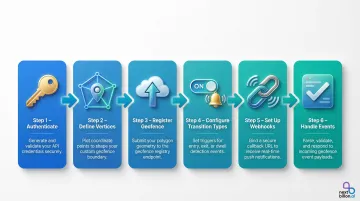
Step 1: Authenticate with the API
Most geofence APIs use API key headers or OAuth 2.0 bearer tokens.
Correct HTTP header formats:
- Bearer token:
Authorization: Bearer <token> - API key:
x-api-key: <key>
Authentication failures return 401 (missing/invalid credentials) or 403 (valid credentials, insufficient permissions) errors that can appear identical to network errors if not logged correctly.
Step 2: Define Polygon Vertices
Construct the coordinate array by gathering lat/lng pairs that trace the boundary in sequential order (clockwise or counter-clockwise depending on API spec), and close the polygon by repeating the first coordinate as the last.
Minimal valid polygon (4 vertices with closure):
{ "type": "Polygon", "coordinates": [ [ [100.0, 0.0], [101.0, 0.0], [101.0, 1.0], [100.0, 1.0], [100.0, 0.0] ] ]}The OGC Simple Features specification dictates that polygon rings may not self-intersect—they may neither touch nor cross themselves.
Step 3: Register the Geofence via API
Submit a POST request to create the geofence with:
- Polygon coordinate array
- Unique geofence ID or name
- Optional metadata (tags, expiry time, associated asset IDs)
The response returns a geofence ID—store this. It's required for monitoring and deletion calls.
Example registration patterns by provider:
| Provider | Endpoint Pattern | Geometry Format | Max Vertices |
|---|---|---|---|
| AWS Location | PUT /geofencing/v0/collections/{CollectionName}/geofences/{GeofenceId} | GeoJSON Polygon / MultiPolygon | 1,000 |
| Radar | PUT /api/v1/geofences/:tag/:externalId | GeoJSON coordinates array | Provider-specific |
| HERE | POST /geofences/v2 | Array of points (auto-closes if needed) | Provider-specific |
Step 4: Configure Transition Event Types
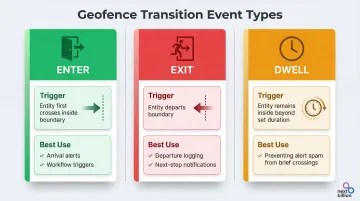
With the geofence registered, the next decision is which transition types to listen for. Standard transition types and when to use each:
| Event | Trigger | Best For |
|---|---|---|
| ENTER | Entity first crosses inside the boundary | Arrival alerts, workflow triggers |
| EXIT | Entity departs the boundary | Departure logging, next-step notifications |
| DWELL/LOITERING | Entity stays inside beyond a defined duration | Preventing alert spam from brief crossings |
Dwell thresholds require calibration by use case. Research on last-mile delivery shows thresholds ranging from 2–45 minutes—with tighter calibrations (as low as 60 seconds) for e-cargo vehicles in dense urban environments.
Step 5: Set Up Event Listeners or Webhooks
Once transition types are configured, choose how your system receives those events:
| Method | How It Works | Trade-offs |
|---|---|---|
| Polling | Periodic API calls check position against registered geofences | Simpler to implement; adds latency |
| Webhooks | API pushes to your registered endpoint on each transition | Lower latency; preferred for real-time operations |
If using webhooks, your endpoint must meet these requirements:
- Publicly accessible URL
- Returns a 2xx status code quickly to confirm receipt
- Handles exponential backoff retries — some platforms retry failed deliveries for up to 3 days
Step 6: Handle and Process Geofence Events
Typical event payload structure:
- Geofence ID
- Transition type (enter/exit/dwell)
- Triggering entity's ID
- Timestamp
- Triggering coordinates (optional)
Event handlers must be idempotent—the same event can be delivered more than once, and delivery order is not guaranteed. Log processed event IDs and skip duplicates on re-delivery.
Testing and Validating Your Polygon Geofences
Visual Validation Before Live Testing
Render the registered polygon on a map visualization tool using the stored coordinates. Tools like geojson.io let you view polygon shapes instantly. Coordinate input errors show up as visually wrong shapes — catching them before any device testing begins.
Functional Testing with Simulated Coordinates
Use the geofence API's point-in-polygon endpoint (if available) to test whether specific lat/lng values are correctly classified as inside or outside the boundary. The winding number algorithm computes whether a point is inside a polygon and handles non-simple polygons correctly.
Two tools cover most validation scenarios: Turf.js booleanPointInPolygon works client-side for quick JavaScript-based checks, while PostGIS ST_IsValid is the right call when validating geometry stored in a spatial database.
Transition Event Validation
Verify that ENTER, EXIT, and DWELL events fire correctly by posting test location updates that simulate crossing the boundary:
- Check event type matches expectations
- Verify geofence ID is correct
- Confirm timestamp is recent
- Validate triggering coordinates
Missing events on boundary crossing usually point to one of these:
- Misconfigured webhook endpoint — confirm the URL is registered and reachable
- Unclosed polygon — the first and last coordinate must be identical
- Winding order error — counterclockwise vs. clockwise matters for some APIs
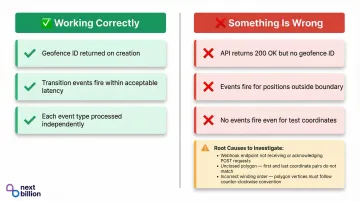
Indicators of Correct vs. Incorrect Implementation
Use these behavioral signals to confirm your implementation is working:
Working correctly:
- Geofence ID returned on creation
- Transition events fire within acceptable latency on boundary crossing
- Each event type (ENTER, EXIT, DWELL) processed independently
Something is wrong if:
- API returns 200 OK but no geofence ID
- Transition events fire for positions clearly outside the zone
- No events fire at all, even for test coordinates crossing the boundary
Common Polygon Geofence API Issues and Fixes
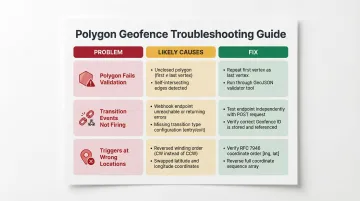
When a polygon geofence doesn't behave as expected, the root cause usually falls into one of three buckets: a malformed polygon definition, broken event delivery, or a coordinate system mismatch. The fixes below map directly to each failure type.
Polygon Fails Validation on Registration
The API returns a 400 or validation error on registration. Likely causes:
- Polygon not closed (first and last coordinate don't match)
- Fewer than three distinct vertices
- Self-intersecting polygon
AWS Location Service returns 400 ValidationException for errors like "polygon ring is not closed" or "polygon ring has fewer than 4 positions."
To fix:
- Repeat the first vertex as the last entry in the coordinate array
- Confirm all vertices are distinct (no duplicates)
- Run the payload through a GeoJSON validator to catch crossed edges before submission
Transition Events Not Firing
The tracked entity crosses the boundary, but no ENTER or EXIT events arrive. Likely causes:
- Webhook endpoint not reachable (returns non-2xx or times out)
- Geofence registration didn't persist (no stored geofence ID)
- Transition type not configured in registration payload
To fix:
- Test the webhook endpoint independently with a mock POST request before going live
- Confirm a geofence ID was returned and stored after registration
- Check that ENTER and EXIT transition types are explicitly listed in the geofence creation payload
Geofence Triggers at Wrong Locations
ENTER events fire for positions outside the boundary, or the zone appears inverted. This typically points to a coordinate ordering issue. Likely causes:
- Coordinate winding order reversed (clockwise instead of counter-clockwise or vice versa)
- Lat/lng values swapped in coordinate array
To fix:
- Verify the required winding order in your API's docs (RFC 7946 requires counter-clockwise for exterior rings)
- Reverse the coordinate sequence if the zone appears inverted
- Double-check coordinate order —
[longitude, latitude]vs.[latitude, longitude]varies by API
Best Practices for Polygon Geofence Implementation
Keep Polygon Complexity Proportional to Use Case
High-vertex polygons increase processing overhead and can introduce edge case failures at near-boundary positions. For most fleet and delivery use cases, 4–20 vertices are sufficient to represent real-world zones accurately.
Use the Douglas-Peucker algorithm to simplify complex administrative boundaries before registering them. GDAL provides SimplifyPreserveTopology and Shapely provides simplify(preserve_topology=True) to reduce vertices while avoiding invalid geometries.
Use DWELL Transitions in High-Traffic Environments
In scenarios where vehicles frequently pass near or briefly enter a zone boundary (urban delivery corridors), configuring a minimum dwell time before triggering an event prevents alert flooding and reduces downstream processing load.
Re-Register Geofences After Disruption Events
Geofences registered via API may not persist across app reinstalls, cache clears, or service restarts depending on the platform. On Android, apps must re-register geofences after device reboot by listening for the boot complete action.
Build a re-registration routine triggered by app startup or session initialization. For enterprise deployments, NextBillion.ai's Geofencing API provides persistent geofence storage with server-side management, eliminating client-side re-registration complexity and supporting large-scale polygon geofence operations for logistics fleets.
Manage Mobile OS Limits
Both major mobile platforms impose hard limits on simultaneous geofence monitoring:
For applications requiring hundreds or thousands of active geofences, server-side geofence evaluation is necessary.
Frequently Asked Questions
What is polygon geofencing?
Polygon geofencing is a method of defining a virtual geographic boundary using an ordered set of latitude/longitude coordinate pairs—as opposed to a center point and radius. This allows the boundary to follow any custom shape such as a delivery zone, service territory, or warehouse perimeter.
What are the two main types of geofencing?
The two main types are circular (radius-based) geofencing, which defines a boundary using a center coordinate and fixed radius, and polygon geofencing, which uses a series of connected coordinate points to trace a custom boundary shape. Polygon geofencing is better suited to irregular real-world zones that a circle can't accurately represent.
How do I create a geofence using the Polygon Geofence API?
Obtain an API key and construct a closed coordinate array representing the polygon boundary (first coordinate repeated as last). Then submit a POST request to the geofence creation endpoint with the coordinates and required metadata — geofence ID and transition event types.
Is the Polygon Geofence API free?
Pricing varies by provider. Some offer limited free tiers; enterprise platforms typically charge by usage volume, geofence count, or a fixed monthly fee. For example, AWS Location Service bills per position evaluation and Azure Maps charges per transaction — per-call models can get expensive at scale, making fixed-fee providers a stronger fit for high-frequency operations.
How many vertices can a polygon geofence have?
The maximum vertex count depends on the API provider, but most platforms support dozens to hundreds of vertices per polygon. AWS Location Service supports up to 1,000 vertices. High vertex counts can affect processing performance — most real-world zones work well under 100 vertices.
How do I detect when a vehicle enters or exits a polygon geofence?
Detection uses transition events configured at geofence registration to fire on ENTER, EXIT, or DWELL conditions. Events are delivered via webhooks or through polling the geofence API with the vehicle's current coordinates.