
Introduction
Businesses that rely on field teams, delivery fleets, or mobile assets often react to location changes after the fact—tracking where workers were, not where they are. This delay creates real gaps: late customer notifications, missed compliance windows, and manual status updates that slow everything down. Geofencing closes this gap by converting physical boundary crossings into immediate, automated system responses — when a driver enters a delivery zone or a vehicle breaches a restricted area, the system knows instantly and acts.
Setting up a geofence is straightforward: draw a boundary, set a radius, and you're done. Getting triggers to fire reliably is a different problem. Radius size, GPS signal quality, trigger type, dwell thresholds, and event handler architecture all determine whether your geofence becomes a dependable automation layer or a source of false alerts and silent failures.
This guide walks through what a geofence trigger event actually is, how to configure one correctly, which parameters matter most, and how to diagnose failures when triggers don't behave as expected.
TLDR
- A geofence trigger event fires when a tracked device crosses a virtual geographic boundary—entering, exiting, or dwelling inside a defined zone
- Three core trigger types—ENTER, EXIT, and DWELL—each suit different operational use cases
- Trigger reliability hinges on geofence radius, GPS signal quality, event latency, and pipeline configuration
- Most failures—missed triggers, false positives, delayed events—trace back to poor radius sizing, missing permissions, or bad dwell thresholds
- Real-time use cases span last-mile delivery, field service dispatching, on-demand delivery ETAs, fleet compliance monitoring, and more
What Is a Geofence Trigger Event?
A geofence trigger event is a system-generated signal produced when a GPS-tracked entity—vehicle, device, or worker—crosses a predefined geographic boundary. These triggers initiate automated workflows such as notifications, status updates, webhooks, or dispatch commands. The geofence itself combines awareness of a user's current location with proximity to a defined location of interest (latitude, longitude, and radius).
According to Verizon Connect's Fleet Technology Trends research, 80% of fleet professionals now rely on GPS fleet tracking technology, reflecting widespread adoption of location-based automation across logistics operations.
Types of Geofence Triggers
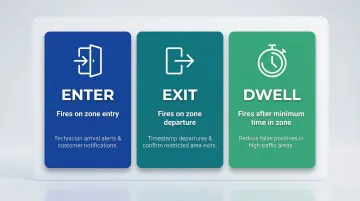
The three core trigger types differ in their behavioral firing conditions:
- ENTER – Fires the moment a device crosses into the zone, ideal for notifying dispatch when a technician arrives or alerting customers that a delivery driver is near
- EXIT – Fires when the device leaves the boundary, used to timestamp departure from customer sites or confirm workers have left restricted areas
- DWELL – Fires only after the device remains inside the zone for a defined duration, best suited for reducing false-positive alerts in high-traffic areas where vehicles briefly pass through boundaries
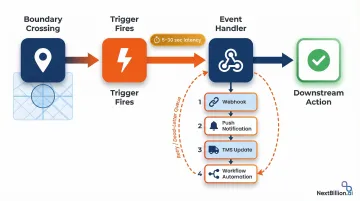
Once a trigger fires, it passes through a backend event handler (webhook, BroadcastReceiver, or cloud function) that executes a downstream action. Depending on the system, that action might:
- Update delivery status in a TMS
- Send a push notification to an end customer
- Trigger a workflow automation in a field service management platform
How to Set Up Geofence Triggers to Fire Real-Time Events
Step 1: Define Your Geographic Zones
Identify the physical locations that need monitoring: customer sites, depots, restricted areas, delivery zones. Determine whether each zone requires a circular or polygon boundary. Circular zones defined by latitude, longitude, and radius are simpler to configure and better supported across platforms.
Set an appropriate radius for each zone before proceeding. Android official documentation explicitly recommends a minimum geofence radius of 100–150 meters for outdoor zones using GPS/Wi-Fi triangulation.
Tighter radii increase the risk of missed triggers due to normal location drift, which ranges from 20–50 meters when Wi-Fi is available and degrades to several hundred meters in rural areas without Wi-Fi assistance.
Step 2: Choose Your Trigger Type and Configure the Geofencing API
Select the correct trigger type (ENTER, EXIT, or DWELL) for each zone based on the intended action:
- Use ENTER to notify dispatch when a technician arrives at a service call
- Use EXIT to timestamp a delivery departure and calculate on-site duration
- Use DWELL to confirm a worker is on-site for a minimum duration before updating job status
When selecting a geofencing platform or API, ensure it supports customizable trigger configurations, real-time event delivery via webhooks or push, and the scale of simultaneous zones your operation requires.
NextBillion.ai's Geofencing API supports high-volume zone monitoring with configurable trigger types and low-latency event delivery suited for logistics and field service operations. Field service companies using the platform have achieved a 40% reduction in scheduling time through automated dispatching based on geofence containment.
Platform capacity constraints matter: Apple CoreLocation strictly limits apps to monitoring 20 regions simultaneously, while Android allows up to 100 geofences per device user. If your operation requires monitoring more zones than these limits allow, you'll need server-side geofencing logic that evaluates device positions against zone boundaries in your backend.
Step 3: Set Up the Event Handler
Define what happens after a trigger fires by configuring an event handler. This could be:
- A webhook endpoint that receives the trigger payload and initiates a downstream action
- A mobile push notification sent to drivers or customers
- A status field update in your TMS or FSM system
- A workflow automation that reassigns tasks or updates schedules
Once your handlers are defined, validate that each can process triggers in near real-time. Include error handling logic — retry on failure, dead-letter queues — to prevent silent trigger drops during connectivity interruptions. Most geofencing services introduce 5–30 seconds of latency between a boundary crossing and event delivery, so design your pipeline to handle that delay gracefully.
Step 4: Test Triggers Before Deploying to Production
Test each trigger type in a controlled environment before going live:
- Simulate device movement using location mocking tools (using adb on Android)
- Physically move a test device across the zone boundary
- Verify that each transition type fires as expected
- Confirm that the downstream action executes correctly
Critical checks before deployment:
- Location permissions: Confirm that both foreground and background location access are correctly configured on all tracked devices
- Geofence persistence: Verify that geofences are re-registered after device reboots, app reinstalls, or app data clears—most platforms do not automatically restore geofences after these events
Key Parameters That Affect Geofence Trigger Accuracy and Timing
Trigger behavior is never purely binary. Accuracy, latency, and reliability all vary based on how key parameters are configured. Understanding these variables is essential for avoiding silent failures or alert floods in production.
Geofence Radius
Radius determines how far from the zone center a device must be before a trigger fires. Too small a radius causes missed triggers when GPS signal drifts; too large a radius produces premature or inaccurate triggers.
Set the minimum radius based on the expected location accuracy of the environment:
- 100–150 meters for outdoor GPS (Android's recommended baseline)
- 50 meters where Wi-Fi positioning is reliable
- Larger buffers for rural or high-speed vehicle scenarios
GPS-enabled smartphones are typically accurate to within 4.9 meters under open sky, but this degrades in real-world conditions. Wi-Fi positioning usually lands between 20 and 50 meters. Without Wi-Fi—common in rural driving—accuracy can fall to several hundred meters or more, so larger geofence radii are needed.
Trigger Latency
Geofencing services don't poll location continuously. Most platforms check for boundary crossings at intervals, so there's always some lag between a physical crossing and the event firing.
Android 8.0+ background location limits intentionally delay geofence triggers to conserve battery — average delivery latency runs 2–3 minutes, and up to 6 minutes if the device is stationary. Design downstream workflows to tolerate this delay rather than assuming instantaneous delivery.
On iOS, the system requires the device to cross the boundary, travel a minimum distance, and remain outside for at least 20 seconds before firing. This filters spurious notifications but adds its own latency.
Dwell Duration (Loitering Delay)
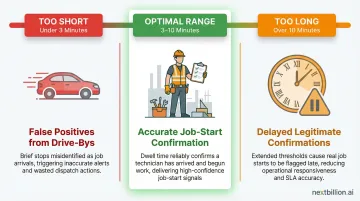
The DWELL trigger type requires the device to remain inside the zone for a configured minimum duration before firing. This threshold controls how tolerant the system is of brief, incidental crossings — a delivery driver slowly passing a customer's block, for example, shouldn't trigger a job-start confirmation.
Set dwell thresholds that match the realistic minimum time a worker or vehicle should spend at a location:
- Too short: false positives from drive-bys
- Too long: delays legitimate job-start confirmations
- Typical range: 3–10 minutes, depending on use case
Location Signal Quality
GPS accuracy degrades indoors, in dense urban canyons, in tunnels, and in rural areas with no Wi-Fi. The device's reported position may not accurately reflect where it actually sits relative to the geofence boundary.
Multipath interference and Non-Line-of-Sight reception in urban canyons can introduce pseudorange errors of tens to hundreds of meters — enough to flip a trigger that should never have fired.
For zones in low-signal environments:
- Increase the geofence radius to absorb positional drift
- Use DWELL instead of ENTER to filter out signal bounce
- Confirm your platform supports Wi-Fi or cell-tower positioning as a fallback
When to Use Geofence-Triggered Events (and When Not To)
Geofence-triggered events are well suited for operations where location crossing is a meaningful business signal:
- Auto-updating delivery status when a driver enters a customer zone
- Triggering turn-by-turn handoff to field technicians on arrival
- **Sending ETA push notifications** to end customers
- Logging actual arrival vs. scheduled arrival time for performance tracking
- Detecting unauthorized asset movement outside a depot or service area
- Flagging compliance breaches for vehicles entering restricted zones
These use cases translate to concrete results. J. Polep Distribution uses Samsara geofencing to alert yard staff when a vehicle is approaching, giving them time to prepare the loading dock and cut wait times. FortisBC geofenced muster areas using Geotab to enforce 15-minute idling limits, reducing idle time by 35% in the first year.
When Geofence Triggers Are a Poor Fit
Not every operation is a clean fit. Some scenarios require additional safeguards — or a different approach entirely:
- High-speed vehicle movement – Dwell triggers are preferable to avoid drive-by false positives
- Dense urban environments with GPS multipath errors – Wider radii and signal fallback are needed
- Low-connectivity environments – Event delivery cannot be guaranteed in real time
- Sub-second response requirements – Geofencing inherently carries latency
A 2019 study on smartphone geofencing observed a 40.2% false positive rate using standard point-and-radius methods in metro areas, highlighting the need for appropriate configuration in challenging environments.
Operational and Compliance Considerations
Location tracking requires clear disclosure to field workers and adherence to local data privacy regulations. As of January 1, 2023, California's CCPA/CPRA employee data exemptions expired, granting workers explicit rights over their precise geolocation data. Under these rules, workers can:
- Know what personal data is collected and why
- Request deletion of that data
- Limit the use and disclosure of sensitive personal information
In Europe, the UK ICO states that employers must identify a lawful basis for monitoring, and because monitoring poses high risks to workers' rights, a Data Protection Impact Assessment (DPIA) is required under GDPR. Teams should establish usage policies and data retention policies for event logs before deployment, not after.
Common Mistakes and Troubleshooting Geofence Trigger Failures
Setting a Geofence Radius That Is Too Small
The most common configuration mistake is setting a geofence radius too small for the environment's GPS accuracy. On most mobile devices outdoors, location accuracy ranges from 20–50 meters with Wi-Fi enabled — and significantly worse without it.
A 50-meter radius geofence will frequently fail to trigger reliably. Use a minimum radius of 100–150 meters for outdoor zones unless you've verified higher accuracy in your specific environment.
Silent Trigger Failures
Triggers that appear configured correctly but never fire are almost always caused by:
- Missing background location permissions on tracked devices
- Geofences not re-registered after a device reboot or app data clear
- Network connectivity issues that prevent the location service from resolving the device's position
Android geofences are Android wipes geofences after a device reboot—apps must listen for BOOT_COMPLETED to re-register zones. Similarly, iOS only resumes monitoring after the user unlocks the device following a reboot.
Alert Spam and False Positives
If triggers are firing too frequently or for unintended crossings:
- Switch from ENTER to DWELL with an appropriate loitering delay (3–10 minutes)
- Increase the geofence radius to account for GPS drift
- Apply trigger filters that limit event creation to a relevant time window (e.g., only during active shift hours or within a defined booking window)
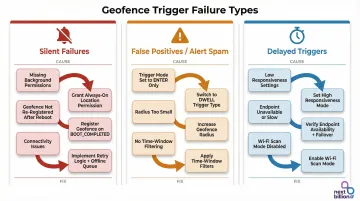
Delayed or Inconsistent Triggers
If events arrive late or inconsistently:
- Investigate whether the platform's notification responsiveness setting is configured for power efficiency rather than speed — higher responsiveness conserves battery but adds latency
- Confirm that the event handler endpoint is reachable and not rate-limiting inbound trigger payloads
- Enable Wi-Fi scan mode — Android applications may never receive geofence alerts without it. Use
SettingsClientto prompt users to turn on "Wi-Fi scan only mode"
Most geofence failures trace back to one of the issues above. Auditing permissions, registration persistence, and radius sizing resolves the majority of real-world trigger problems before they require deeper investigation.
Frequently Asked Questions
What is a geofence trigger event?
A geofence trigger event is a system-generated signal that fires when a GPS-tracked entity crosses a virtual geographic boundary. Common trigger types include entry, exit, and dwell, used to automate actions like notifications, status updates, or workflow initiations.
What is the purpose of geofencing?
Geofencing automates responses to real-world movement — confirming worker arrivals, detecting unauthorized asset movement, or delivering contextually timed customer notifications. It connects physical location to digital action, so businesses can respond to what's happening in the field without manual intervention.
What are the different types of geofencing?
The three main trigger-based types are enter, exit, and dwell. Shape-based distinctions include circular geofences (defined by a center point and radius) and polygon geofences (defined by a custom boundary). Circular fences work well for simple zones like depots; polygon fences handle irregular areas like port facilities or campuses.
How accurate is real-time geofence triggering?
Accuracy depends on GPS signal quality, device type, and geofence radius. Outdoor accuracy is typically 20–50 meters with Wi-Fi available. Trigger latency is generally under 2 minutes for moving devices but can reach up to 6 minutes for stationary ones.
What is the minimum radius for reliable geofence triggers?
A minimum radius of 100–150 meters is recommended for most outdoor use cases. Smaller radii increase the risk of missed triggers due to normal GPS drift, while larger radii are needed in rural areas or wherever Wi-Fi positioning is unavailable.
Can a single geofence trigger multiple events simultaneously?
Yes. A single boundary crossing can trigger multiple event types or notify multiple systems at once, depending on your event pipeline configuration. For example, a driver entering a delivery zone could update a TMS record and fire a customer ETA notification in the same moment.