Introduction
Geofence push notifications have become infrastructure-level technology across logistics, fleet management, and field service operations. The use cases are concrete:
- Delivery apps send "your driver is nearby" alerts as drivers approach
- Fleet operations flag when vehicles enter depots or restricted zones
- Field service platforms notify customers the moment a technician arrives on site
Yet despite widespread adoption, most teams treat geofence push notifications as a simple "enter zone → send message" tool. They overlook the precision layering, behavioral filtering, and operational logic required to make them effective at scale. The result? Over-triggering that annoys users, false positives from GPS drift, and wasted notifications that don't align with user intent or journey stage.
This article breaks down how geofence push notifications work — covering zone definition, OS-level monitoring, and rule-based dispatch — with concrete best practices for logistics, fleet management, and field service operations.
TLDR
- Geofence push notifications fire when a device enters, exits, or dwells within a virtual boundary defined by GPS, Wi-Fi, or Bluetooth signals
- The pipeline runs in three stages — zone definition → event detection → notification dispatch — with the OS monitoring boundaries even when the app is closed
- Best practices include right-sizing geofence radius, layering behavioral filters, frequency capping, and transparent permission requests
- Top use cases include last-mile delivery ETA alerts, fleet zone monitoring, field service arrival notifications, and retail proximity marketing
What Are Geofence Push Notifications?
Geofence push notifications are automated alerts sent to a mobile device when it crosses a virtual geographic boundary — triggered by GPS coordinates, Wi-Fi positioning, cellular triangulation, or Bluetooth beacons. When a delivery driver enters a customer's neighborhood or a field technician arrives at a job site, the system detects the boundary crossing and fires a notification without manual intervention.
Unlike bulk location-based broadcasts or IP-targeted ads, geofence notifications require explicit user permission, a registered SDK embedded in the app, and a device actively monitored by the operating system. Both iOS and Android enforce strict privacy controls — users must grant location access, and apps must declare background monitoring permissions.
Traditional communication tools can't reach users at the precise moment physical context makes a message actionable. A "your driver is nearby" alert sent 10 minutes too early wastes attention. Sent 10 minutes too late, it misses the window when the user can act. Geofence push notifications close this gap by tying communication to real-world movement.
How well they work depends largely on which underlying technology you deploy. Two approaches dominate:
- Geofencing (GPS/Wi-Fi boundary): Virtual perimeters defined by latitude/longitude and radius, accurate to tens of meters outdoors. Best for delivery zones, store locations, and depot boundaries.
- Beacon-based proximity (Bluetooth hardware): Physical BLE devices that enable meter-level accuracy indoors where GPS fails. Ideal for airport gates, warehouse aisles, hospital wards, and retail checkout zones.
The right choice depends on whether your use case prioritizes outdoor coverage and scalability (geofencing) or indoor precision and precise control (beacons).
How Do Geofence Push Notifications Work?
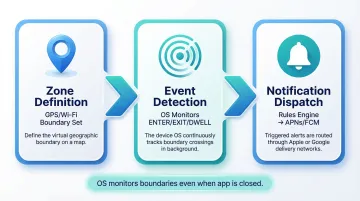
Geofence push notifications operate through a three-stage pipeline: zone definition → event detection → notification dispatch. OS-level monitoring ensures this functions even when the app is closed, making the system reliable for time-sensitive operations like delivery alerts and fleet tracking.
Defining the Geofence Zone
A geofence is created by specifying a latitude/longitude center point and a radius, then registering the zone in the app's SDK or via a geofencing API. For retail proximity campaigns, typical radii range from 300–500 meters, giving users time to react before passing the location. Logistics operations — delivery depots, parking lots, customer drop-off points — benefit from tighter polygon zones drawn to match actual boundaries for better precision.
At scale — hundreds or thousands of locations — manual zone creation becomes impractical. NextBillion.ai's Geofencing API lets teams create, update, or deactivate zones dynamically through API calls, which keeps pace with high-volume logistics workflows where zones shift frequently based on delivery assignments or service territories.
One critical constraint: iOS limits apps to monitoring 20 geofence regions simultaneously, while Android allows up to 100 geofences per device user. Enterprise implementations managing thousands of zones must use dynamic "rolling window" logic — swapping in the nearest relevant zones as the device moves to stay within platform limits.
Detecting Location Events
The mobile OS — not the app itself — monitors registered geofence boundaries to conserve battery. When a device crosses a boundary, the OS wakes the app's SDK briefly to log an ENTER, EXIT, or DWELL event. This happens in the background, even if the user hasn't opened the app in days.
Location signals are blended for accuracy:
- GPS: Provides outdoor precision, typically accurate to 8 meters in open areas
- Wi-Fi positioning: Improves accuracy in dense urban environments and indoor spaces
- Cell-tower triangulation: Acts as a less precise backup when GPS and Wi-Fi are unavailable
Accuracy varies, and implementations must account for GPS drift causing false triggers near zone edges. A delivery driver sitting in traffic 50 meters outside a geofence might briefly register as "inside" due to signal fluctuation.
OS-imposed dwell delay: To prevent triggering for users merely passing by, both iOS and Android apply a confirmation window before firing the event. On Android, developers can configure loitering delay thresholds using setLoiteringDelay — for example, requiring a device to remain inside a zone for 5 minutes before triggering a dwell event. This reduces false positives in high-traffic zones like malls, warehouses, or event venues.
Triggering and Delivering the Notification
An entry or exit event alone does not guarantee a push notification. The event passes into a rules engine that checks:
- Segmentation membership (is this user part of the target audience?)
- Frequency caps (have they already received a geo-notification today?)
- Quiet hours (is it outside acceptable notification times?)
- Consent flags (did they opt in to location-based alerts?)
- Recent behaviors (have they browsed relevant products or placed an order?)
- Journey stage (is the delivery "out for delivery" or still in the warehouse?)
Only after passing these filters does the system generate a push payload and send it via APNs (iOS) or FCM (Android), which maintain persistent device connections for near-instant delivery. Neither APNs nor FCM provides strict latency SLAs — both operate on a "best-effort" basis.
Delivery latency is a real constraint: Battery optimizations like Android Doze mode can delay background geofence alerts by 2 to 6 minutes when the device is stationary or has poor connectivity. For delivery ETAs or fleet dispatch — where a 3-minute delay changes what the notification says — on-device or low-latency server-side evaluation is the more reliable architecture.
Types of Geofence Push Notification Triggers
Different trigger types serve distinct operational needs. Choosing the right combination ensures notifications fire at the moment they're most relevant.
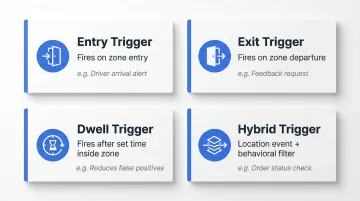
Entry triggers fire when a device crosses into a geofence zone. Best for:
- Welcome offers when customers approach a retail store
- Curbside pickup alerts when a customer arrives at a parking lot
- Driver arrival confirmation when a delivery vehicle enters a neighborhood
Exit triggers activate when a device leaves a zone. Useful for:
- Feedback requests after a customer leaves a store
- Route-complete notifications when a driver exits the final delivery zone
- Departure reminders or next-step instructions
Dwell time triggers activate only after a device remains inside a zone for a set period. This reduces false positives in high-traffic zones — such as malls, warehouses, or event venues. A 5-minute dwell requirement, for example, ensures the notification only fires for users who've genuinely stopped, not those briefly driving past.
Unlike the above software-only triggers, hybrid triggers layer a location event with a behavioral filter to cut irrelevant alerts entirely. For example:
- A delivery driver entering a drop-off zone triggers a customer-facing ETA notification only if the order status is "out for delivery"
- A field technician entering a job site geofence triggers an arrival alert only if the technician is assigned to that specific job
This layering sharply improves message precision.
Where GPS falls short indoors, beacon-based proximity triggers take over. They use Bluetooth Low Energy (BLE) hardware to enable meter-level accuracy at airport gates, hospital wards, warehouse aisles, and retail checkout areas — anywhere sub-5-meter precision matters.
Best Practices for Geofence Push Notifications
Effective geofence push notifications require careful configuration, behavioral layering, and respect for user attention. Follow these practices to maximize relevance and minimize opt-outs.
Size Geofence Radius by Use Case
- Retail foot-traffic campaigns: 300–500 meter radius gives users time to react before passing the location
- Delivery and fleet operations: tighter polygons drawn to actual lot or zone boundaries prevent over-triggering
- Over-large zones flood users with irrelevant triggers and inflate notification volume without adding value
Layer Behavioral Context Before Firing
Location alone does not equal intent. Filter triggers against user state:
- Has the customer browsed relevant products?
- Is the driver on an active route?
- Is the field technician assigned to this job?
- Is the order status at the right stage (for example, "out for delivery" vs. "preparing")?
This ensures the notification is relevant to the individual, not just anyone in the zone.
Implement Frequency Capping and Quiet Hours
Research shows that sending more than 5 push messages per week acts as a frequency ceiling — pushing past this limit causes nearly 46% of users to opt out. Set a maximum of one to two geo-triggered notifications per user per day and enforce time windows that align with user behavior. Avoid triggering at night, during off-hours, or within minutes of a previous notification.
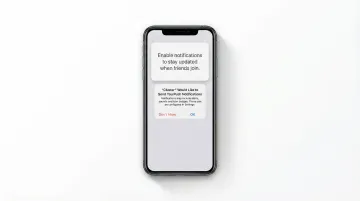
Request location permissions with transparent value framing:
Apple's Human Interface Guidelines recommend requesting permission only when the app clearly needs access to the data. Present a pre-permission screen that explains the specific benefit in plain language before the OS prompt appears:
- ✅ "We'll notify you the moment your delivery driver is nearby"
- ❌ "Enable location to improve your experience"
Minimize permission scope to what the use case actually requires — foreground vs. background, precise vs. approximate.
Personalize notification content using location context:
Dynamically insert zone-relevant details into the message:
- Nearest store name and current offers
- Assigned technician name and photo
- Estimated arrival time based on live tracking
- Order details and delivery instructions
Done consistently, this is what separates notifications users act on from ones they mute.
Industry Use Cases for Geofence Push Notifications
Geofence push notifications deliver measurable ROI across logistics, fleet management, field service, and retail. Here's how leading organizations apply them.
Last-Mile Delivery and Logistics
When a delivery driver enters a customer's neighborhood geofence (typically 500 meters to 1 km from the drop-off address), a customer-facing push notification fires with real-time ETA. The business case is concrete: failed deliveries cost an average of $17.78 per order, and approximately 5% of deliveries fail on the first attempt. Real-time arrival alerts reduce missed handoffs by keeping customers informed and available.
Internal operations alerts can also trigger if a driver enters a restricted or high-congestion zone, enabling proactive rerouting. Companies like Onfleet leverage predictive ETAs and automated notifications to reduce failed deliveries and improve first-attempt success rates.
For operations managing dynamic delivery zones across hundreds of locations, API-level geofencing — such as NextBillion.ai's Geofencing API — enables programmatic zone creation and real-time event triggering, removing the manual bottleneck of static zone management.
Fleet Management and Dispatch
Geofence zones around depots, maintenance facilities, and restricted areas enable automated push alerts to fleet managers when vehicles enter or exit. For example:
- A driver leaving the depot triggers a dispatch confirmation, auto-logging departure time
- A truck entering a geofenced maintenance zone auto-logs a service event
- Unauthorized movement after hours triggers a security alert within 90 seconds
Verizon Connect reports that 80% of fleet professionals now rely on GPS tracking, with 44% of users improving productivity and nearly half reporting ROI in less than one year. OxMaint deployed geofencing to automate customer site arrival and departure logs, reducing arrival confirmation disputes to zero and catching unauthorized asset movement in real time.
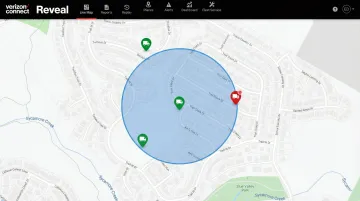
These outcomes illustrate why high-volume, dynamic zone management has become a baseline expectation for modern fleet operations — not a premium add-on.
Field Service Management
When a field technician's device enters the geofenced perimeter of a job site, a push notification can automatically:
- Alert the customer of imminent arrival
- Update the job management system with real-time status
- Start a time-on-site timer for billing accuracy
This reduces manual check-in steps and improves on-time performance visibility. Microsoft Dynamics 365 uses geofences to create virtual perimeters around service accounts — when a technician crosses the boundary, the system automatically changes their status to "inside" and can trigger a mobile push notification or custom workflow.
Retail and Consumer Proximity Marketing
Brands use entry triggers around store perimeters to send personalized offers, loyalty reminders, or contextual product nudges to customers passing by. The ROI is measurable when executed well:
- Burger King's "Whopper Detour" campaign geofenced 14,000 McDonald's locations to offer 1-cent burgers via app, driving 3.2 million new app installs and a 53.7% lift in monthly active users
- RetailMeNot used Radar's geofencing to send contextual push notifications near retail partners, achieving a 19% uplift in store entry events
- Home Depot integrated geofencing into their app for curbside pickup to automatically notify associates of customer arrival, scaling the service rapidly during demand booms
What these campaigns share is a focus on relevance over volume. Canva's localized, context-aware messaging increased open rates by 33% and overall engagement by 2.5% — evidence that personalized triggers consistently outperform generic broadcast pushes.
Frequently Asked Questions
What are geo-fenced push notifications?
Geo-fenced push notifications are automated mobile alerts triggered when a user's device enters, exits, or dwells within a virtual geographic boundary. They're enabled by GPS, Wi-Fi, or Bluetooth signals and require prior user permission and background location access.
Is geofencing API free?
Most geofencing APIs are not free at scale. Pricing models vary from per-API-call billing (common with major mapping providers like Google) to fixed-fee or per-device models. For high-volume logistics and fleet operations, the cost structure matters — per-call pricing can spike sharply during seasonal demand peaks.
Is geofencing legal?
Yes, geofencing is legal but subject to privacy regulations like GDPR and CCPA. Under GDPR, location data is explicitly personal data, and the CPRA defines precise geolocation (within 1,850 feet) as Sensitive Personal Information. Legality hinges on obtaining explicit user consent, limiting data use to stated purposes, and providing clear opt-out controls.
What is the difference between geofencing and beacon-based push notifications?
Geofencing uses GPS and Wi-Fi to define outdoor zones, accurate to tens of meters. Beacons use Bluetooth Low Energy hardware for indoor, meter-level proximity detection. Geofencing scales without hardware investment; beacons deliver superior precision in GPS-denied environments where that tradeoff is worth it.
How accurate are geofence push notifications?
Accuracy depends on the location signal used. GPS is typically accurate to 8 meters outdoors but degrades indoors. Blending Wi-Fi and GPS improves precision, and setting a minimum dwell time reduces false triggers from users passing near zone boundaries.
Can geofence push notifications work when an app is closed?
Yes, on both iOS and Android, the operating system monitors geofence regions at the system level. It wakes the app briefly in the background when a boundary is crossed, allowing notifications to fire even when the app is not actively running — provided background location permission has been granted.